Self-Hosted Homelab Logging,
Without the Complexity
LogShed is one container that collects syslog and Docker logs from your lab, stores them with full-text search, and alerts you when something breaks. AI diagnosis is optional and stays off until you add a provider.
docker pull ghcr.io/logshed/logshed:latest
See What Your Lab Is Logging
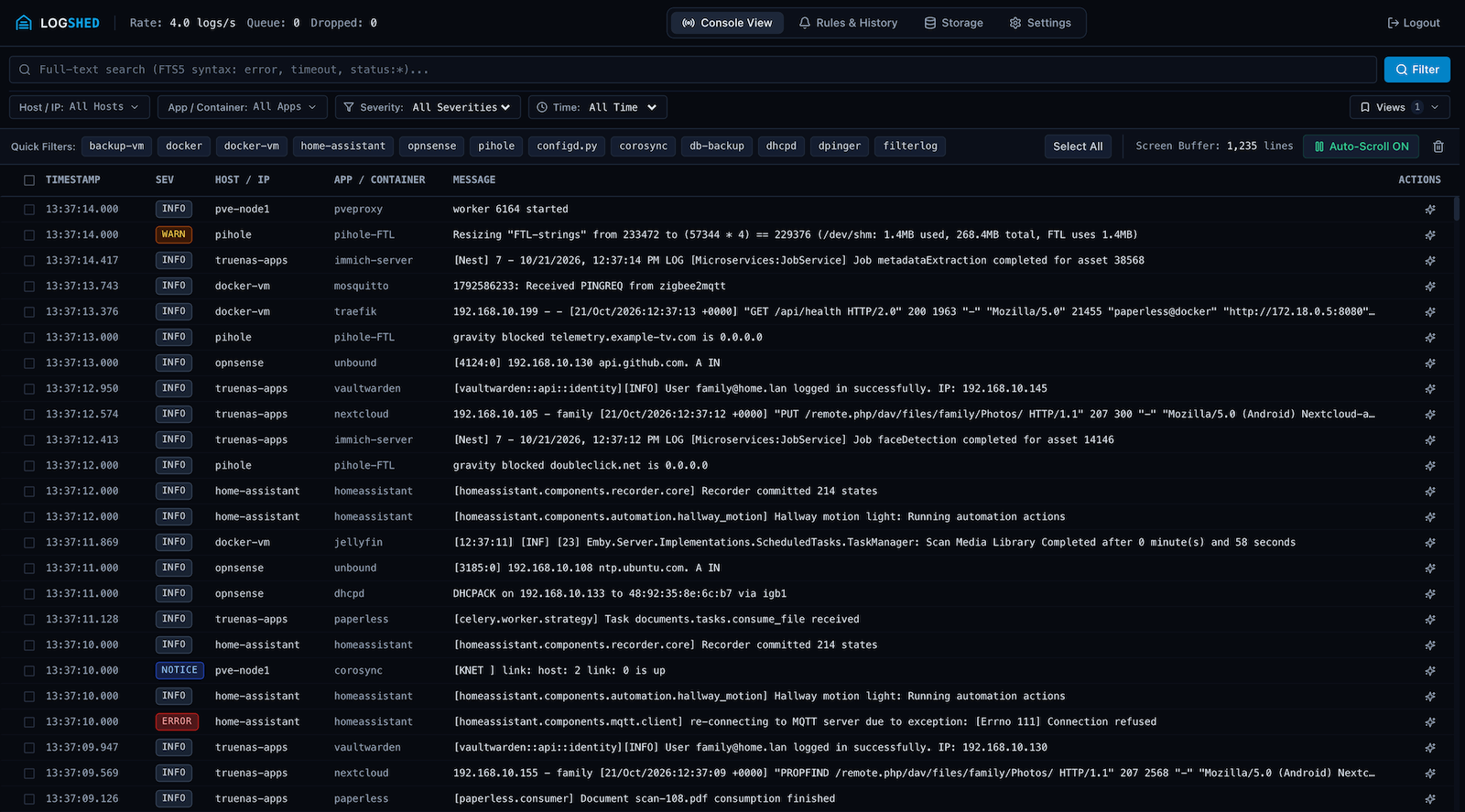
Stream live container and network logs, filter by host or severity, and read the lines around any record in one dark-mode console.
What LogShed Does
For home servers, routers, NAS appliances, and Docker hosts. No external database and no agents to install.
Live Stream & Full-Text Search
Watch logs arrive in real time, then search the history with SQLite FTS5. Shorthand filters such as 15m, 24h, today, and error make it quick to narrow a window. Step through the lines around any record.
Syslog for Routers, NAS & Hypervisors
A built-in UDP and TCP syslog server on port 1514 (RFC 3164 and RFC 5424) for OPNsense, pfSense, Proxmox VE, UniFi, Synology DSM, and Linux hosts. Give each device a friendly name with host aliases.
Noise Control at the Door
Discard cron chatter, health checks, and debug spam in memory before anything touches your SSD. Start from built-in presets, create a rule in one click from a log line, and export or import rules as JSON.
Alerts That Matter
Catch error bursts, log storms, and security events (SSH brute force, auth floods, OOM kills) with threshold, pattern, and rate spike rules and ready-made presets. Send alerts to 100+ services through Apprise, including Ntfy, Discord, Telegram, Gotify, Pushover, Slack, and email.
Maintenance Windows
Silence outgoing alert notifications during planned package updates, homelab restarts, or scheduled backups using recurring schedules or on-demand duration presets while continuing log ingestion.
Optional AI Diagnosis
Off until you add a provider, and every other feature works without it. Diagnose a failure on demand or when an alert fires. Point it at Ollama or any OpenAI-compatible server on your network to keep prompts local, or use Gemini, OpenAI, or Anthropic Claude. Secrets are redacted before anything is sent (best-effort).
Daily Digest & Incident History
Get an automated 24-hour analytical rollup, and review alerts and AI diagnoses in one history timeline. Pin saved filter views with URL sync.
Storage You Control
About 67 MB per 100,000 logs, with all indexes. Lowering retention shows what will be deleted before you confirm. Prune noisy records on demand and compact the database to reclaim SSD space.
Many Docker Hosts & HTTP Ingest
Collect from several Docker hosts over a socket, a socket proxy, or TLS, and send logs from Vector, Fluent Bit, and scripts to POST /api/v1/ingest as JSON or NDJSON.
Home Assistant Integration
Log and error sensors, an Alert State problem sensor, and a Quick Maintenance switch for your backup automations, installed through HACS as a custom repository.
REST API & Scoped Tokens
Call /api/v1 with scoped Bearer tokens from scripts and automation. Read metrics, send logs, and start or end maintenance, with built-in Swagger UI and ReDoc at /docs and /redoc.
MCP Server for AI Assistants
Connect Claude Desktop, Cursor, Windsurf, or Antigravity over Model Context Protocol to search logs, count errors, read the lines around an incident, and manage maintenance.
How LogShed Compares
Dozzle, Grafana Loki, and Graylog are good tools. Here is what each one asks of a homelab, side by side.
| Feature | LogShed | Dozzle | Loki + Grafana | Graylog OpenSSPL, source-available |
|---|---|---|---|---|
| Containers for a minimal setup | 1 | 1 | 3: Loki, Grafana, and a collector (Alloy) | 3: Graylog, Data Node, and MongoDB |
| Typical RAM | About 240 MB, measured with 800,000 logs stored | Not stated | Not stated for a single node | Not stated. The docs advise JVM heaps of about half of RAM |
| Keeps log history | Yes, in SQLite, with retention you set (14 days by default, 30 days at most unless you raise the limit) | No. It reads live from Docker and shows what Docker still holds | Yes, with configurable retention | Yes, with index rotation and retention |
| Full-text search | Yes, SQLite FTS5 over the stored history | Only over what Docker still holds | Indexes labels, not log text. Text search scans the matching streams | Yes, indexed search |
| Syslog server | Yes, UDP and TCP | No. Docker logs only | Not in Loki. Alloy can receive syslog | Yes, syslog inputs |
| Alerting | Alert rules, sent to 100+ services through Apprise | Yes. Log, metric, and event alerts through webhooks | Yes, through the Loki ruler or Grafana alerting | Yes, event definitions with notifications. Some types are in paid editions |
| Home Assistant integration | Coming soon (HACS custom integration) | Community add-ons only | Community add-ons only | None found |
| AI diagnosis | Optional, on demand, with redaction before anything is sent | Optional MCP server. The assistant is only in the hosted Dozzle Cloud | None found | MCP server access for your own LLM |
| Setup | One Compose file | One container. Multiple hosts need agents | Loki and Alloy configs to write, and LogQL to learn | Three containers and a host kernel setting (vm.max_map_count) |
Checked on 21 October 2026 against each project's documentation: Dozzle 11.3, Loki 3.7 with Alloy 2.0 (Promtail is end of life, so Alloy is the collector), and Graylog 7.2. Features and requirements change, so check each project before you decide. Dozzle is a good fit if you only need to watch live Docker logs, and its own docs recommend Loki when you need history. LogShed is built for homelabs, not for multi-tenant or high-throughput setups.
Private by Design
No telemetry. LogShed contacts the internet only in the cases below, and you control each one.
What can leave your network
- Update check: asks ghcr.io for the latest release, only when someone requests the version (not on a timer). It sends no data about your instance, though ghcr.io sees your IP address as with any request. Turn it off with Check for new versions in Settings (the
check_for_updatessetting). - AI providers: only if you configure one. It is called when you run an analysis, when an alert rule with AI enrichment fires, and to refresh the list of models.
- Notifications: only to the Apprise targets you add.
- Docker: only the Docker daemon you point it at (the local socket or a socket proxy on your network).
- The web interface makes no third-party requests. Its scripts and styles all come from your LogShed.
Hardening
- Alert and drop rule patterns are limited to 50 ms per match, and a rule that keeps timing out is disabled.
- Best-effort redaction removes passwords, API keys, tokens, cookies, and private keys before text goes to an AI provider. It is a safety net, not a guarantee.
- Passwords are hashed with Argon2id, sessions use HTTP-only cookies, and login attempts are rate limited.
- AI keys and notification URLs are encrypted at rest.
- A strict Content-Security-Policy on every page.
- You can run LogShed without the Docker socket by using a read-only socket proxy.
Up and Running in Minutes
Deploy as a single container with no external database dependencies. Point /data to a local SSD path and open port 8080. Needs Docker Engine 24.0 or later.
services:
  logshed:
    image: ghcr.io/logshed/logshed:latest
    container_name: logshed
    restart: unless-stopped
    ports:
      - "8080:8080"        # Web Dashboard
      - "1514:1514/udp"    # Syslog UDP Ingestion
      - "1514:1514/tcp"    # Syslog TCP Ingestion
    environment:
      - PUID=1000
      - PGID=1000
      # Set TZ to your own time zone (for example Europe/London or America/New_York).
      # LogShed uses it for syslog timestamps that carry no zone, maintenance schedules and the daily digest.
      - TZ=UTC
      - PORT=8080
      - SYSLOG_PORT=1514
      - DOCKER_HOST=unix:///var/run/docker.sock
    volumes:
      - ./data:/data
- /var/run/docker.sock:/var/run/docker.sock:roCommon Questions
What is LogShed and how does it compare to Dozzle, Grafana Loki, and Graylog?
LogShed is a lightweight, self-hosted log aggregator and syslog server built specifically for homelabs, Unraid servers, and personal VMs. Dozzle is a good live viewer for Docker logs, but it does not store logs and reads Docker logs only. Grafana Loki and Graylog keep history, but they run several services: Loki with Grafana and a collector, Graylog with MongoDB and a search backend. LogShed runs as a single Docker container backed by a local SQLite WAL + FTS5 database, so it keeps history, searches the full text, and receives syslog. In a test with about 800,000 logs stored it used about 240 MB of RAM, and a full-text search took about 50 ms.
What log sources can send logs to LogShed?
LogShed automatically tails local Docker containers over the Docker socket or a docker-socket-proxy, and includes a built-in UDP/TCP Syslog server on port 1514 compatible with OPNsense, pfSense, Proxmox VE, UniFi, Synology DSM, Home Assistant, and standard Linux rsyslog/syslog-ng hosts. Multi-host Docker collection and an HTTP ingest endpoint (POST /api/v1/ingest, JSON or NDJSON) for Vector, Fluent Bit, and scripts are coming soon in v1.3.0.
Do I need an AI provider?
No. AI is off until you add a provider, and every other feature works without it: collection, search, alerts, and maintenance windows. If you do turn it on, you can point LogShed at Ollama or any OpenAI-compatible server on your network to keep prompts local. Passwords, API keys, and tokens are redacted from the prompt before it leaves your server. Redaction is best-effort, and on-demand requests show a preview first.
Which AI models does LogShed support for incident diagnosis?
LogShed supports Google Gemini, OpenAI, Anthropic Claude, and local or OpenAI-compatible models such as Ollama, vLLM, and LocalAI. You can set a primary model and fallbacks.
Does LogShed send any data to the internet?
No telemetry. LogShed's only built-in outbound call is an optional check for new releases against ghcr.io. It runs only when the version is requested, not on a timer, it sends no data about your instance, and you can turn it off with the check_for_updates setting. AI providers are contacted only if you configure one, and notification targets only if you add them. The web interface makes no third-party requests.
Does LogShed work with Home Assistant?
Home Assistant can already forward its syslog output to LogShed on port 1514. A native Home Assistant integration (installed through HACS) with ingestion rate and error sensors, an Alert State problem sensor, and a Quick Maintenance switch is coming soon in v1.3.0.
Explore the Repository
Step-by-step setup guides and technical specifications are maintained directly in the GitHub repository.
Forwarding Logs Guide
Syslog configuration for OPNsense, Proxmox VE, Synology DSM, UniFi, pfSense, Home Assistant, Linux, and Docker.
Configuration Reference
Complete environment variable list, runtime settings hierarchy, and local SSD storage paths.
Alert & Drop Rules Guide
Real-time threshold, regex pattern, and velocity spike alerts, plus in-memory ingestion drop rules.
Technical Specification
System architecture, single-process async workers, SQLite WAL + FTS5 triggers, and security model.
Home Assistant Integration Coming Soon
Install through HACS, create a scoped token, and use the log sensors, Alert State problem sensor, and maintenance switch.
REST API & Scoped Tokens Coming Soon
Scoped Bearer API endpoints for Home Assistant, backup scripts, and external automation.
Model Context Protocol (MCP) Guide Coming Soon
Connect Claude Desktop, Cursor, Windsurf, and Antigravity to query and diagnose homelab incidents.
Multi-Host Docker & HTTP Ingest Coming Soon
Collect logs from several Docker hosts over a socket proxy or TLS, or send JSON and NDJSON to POST /api/v1/ingest.